Git 简介
Reference from houkensjtu | 童仲毅
安装 Git
- Linux 用户:
sudo apt-get install git
检出仓库
克隆仓库:
git clone /path/to/repository
git clone username@host:/path/to/repository (SSH)
git clone https:/path/to/repository.git (HTTPS)
创建新仓库
git init
git status查看git仓库状态
工作流

添加与提交
git add < filename > |
推送
git push origin master |
git init
git init <directory> |
创建一个空的 Git 仓库
git init --bare <directory> |
裸仓库
中央仓库是裸仓库,开发者的本地仓库是非裸仓库。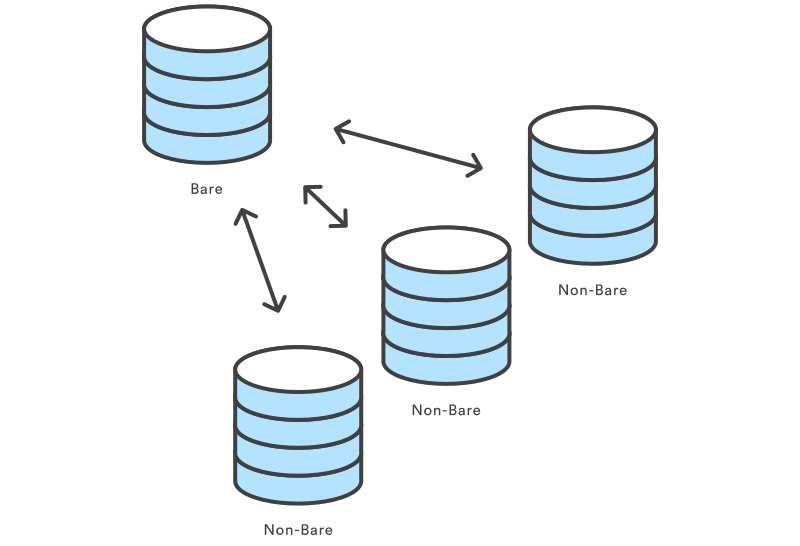
因为 git clone 创建项目的本地拷贝更为方便,git init 最常见的使用情景就是用于创建中央仓库:
ssh <user>@<host> |
git clone <repo> |
将位于 <repo> 的仓库克隆到本地机器。原仓库可以在本地文件系统中,或是通过 HTTP 或 SSH 连接的远程机器。
git clone <repo> <directory> |
将位于 <repo> 的仓库克隆到本地机器上的 <directory> 目录。
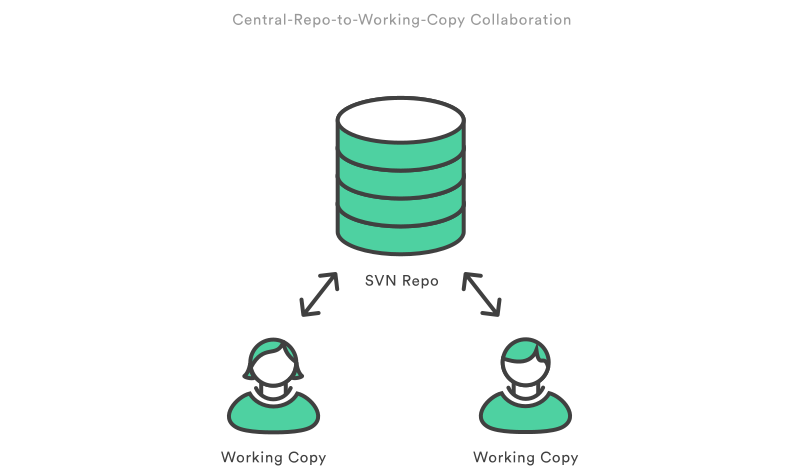
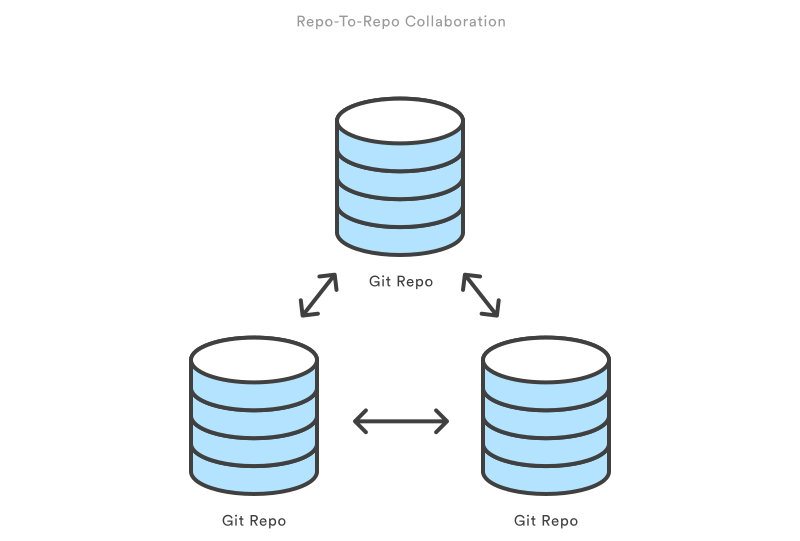
仓库间协作
栗子
下面这个例子演示用 SSH 用户名 john 连接到 example.com,获取远程服务器上中央仓库的本地副本:
git clone ssh://john@example.com/path/to/my-project.git |
第一行命令在本地机器的 my-project 目录下初始化了一个新的 Git 仓库,并且导入了中央仓库中的文件。接下来,你 cd 到项目目录,开始编辑文件、缓存提交、和其它仓库交互。同时注意 .git 拓展名克隆时会被去除。它表明了本地副本的非裸状态。
git config |
git config 命令允许你在命令行中配置你的 Git 安装(或是一个独立仓库)。这个命令定义了所有配置,从用户信息到仓库行为等等。一些常见的配置命令如下所列。
用法
git config user.name <name> |
定义当前仓库所有提交使用的作者姓名。通常来说,你希望使用 --global 标记设置当前用户的配置项。
git config --global user.name <name> |
定义当前用户所有提交使用的作者姓名。
git config --global user.email <email> |
定义当前用户所有提交使用的作者邮箱。
git config --global alias.<alias-name> <git-command> |
为Git命令创建一个快捷方式(别名)。
git config --system core.editor <editor> |
定义当前机器所有用户使用命令时用到的文本编辑器,如 git commit。<editor> 参数用编辑器的启动命令(如 vi)替代。
git config --global --edit |
用文本编辑器打开全局配置文件,手动编辑。
讨论
所有配置项都储存在纯文本文件中,所以 git config 命令其实只是一个提供便捷的命令行接口。通常,你只需要在新机器上配置一次 Git 安装,以及,你通常会想要使用 --global 标记。
Git 将配置项保存在三个单独的文件中,允许你分别对单个仓库、用户和整个系统设置。
/.git/config – 特定仓库的设置。 ~/.gitconfig – 特定用户的设置。这也是
--global标记的设置项存放的位置。$(prefix)/etc/gitconfig – 系统层面的设置。
当这些文件中的配置项冲突时,本地仓库设置覆盖用户设置,用户设置覆盖系统设置。如果你打开期中一份文件,你会看到下面这些:
[user] |
你可以用 git config 手动编辑这些值。
栗子
你在安装 Git 之后想要做的第一件事是告诉它你的名字和邮箱,个性化一些默认设置。一般初始的设置过程看上去是这样的:
# 告诉Git你是谁 |
它会生成上一节中所说的 ~/.gitconfig 文件。